Creating Learning Studios – Live Blog

At NCAIS Tech Conference in a session called Creating Learning Studios with Matt Scully http://pdsblogs.org/mattscully/

He is giving his background and introducing how he is now teaching a Middle School English class and realized that he needed to start over with his thinking and teaching.

Quick Quotes: “What is the point?” – Jonathan Zittrain, “Part of living is working but we need to prepare students for living” – Guy Kawasaski, “Need to create ecosystem for innovation to solves world’s problems” – Thomas Friedman, “Give your works wings; it has to live outside of this classroom, not just die here”, Marco Antonio Torres

The concept of Learning Studio is from Marco Antonio Torres. Matt showed a video done by a student in Marco’s class. It was about a person who could not speak English who ate coffee and donuts until he heard someone order ham and eggs. He wrote it down in his notebook and the next day ordered ham and eggs. I will look for the video although it is a huge metaphor for how we learn and how teachers adopt new tools. If you are happy with a diet of coffee and donuts, you will not be listening when someone orders “ham and eggs”.

There are many authors: Robinson, Pink, Kawasaki, Wagner, Shirky, Gardner, et al, claim that change is needed. This is Matt’s story of how he has attempted to infuse the ideas of these authors.

Tidbits:

Education Week: Backers of ’21st-Century Skills’ Take Flak (“There is a reason teachers have been taught for 75 years to do projects with their students and they don’t do them”.

All of his students have blogs
He uses RSS readers to evaluate
He just got a iPhone – showed video of app called Brushes – $4.99

How Tools:
He balances the work time between instruction and Learning Studio time. He has had to scale back on what he thought he would do. He also pledged not to give them busy work if they pledged to not give him any half-baked work from them.

PDS teacher created a Scarlet Letter Ning – all students are in the Ning in character (one for each class and is private so only class members can access)
TKAM (To Kill a Mockingbird) projects – Must explore a theme, must have a plot, must live beyond the classroom, and must include a write up. (Photo journal, Comic Strips, Character Blog, PowerPoint on why it was written, wiki comparing TKAM and Lord of the Rings, News cast that featured and ending with banter by the anchors remembering a book they read in Middle School, many different types of projects. This is where it can get messy.
RSS Reader – iGoogle for checking posts
Shared Online Apps – Google Docs, Revision History for collaborative writing for who did what and a timeline of when.
Personal Learning Network

“Who ever does the work, does the learning!”
Technorati Tags: ,

Telling the Story of Romeo and Juliet

Mrs. Birgel and I started to work with the students on the Romeo and Juliet project. It involves giving students the creative license to retell an Act from a Scene. They are working either alone or in pairs and choose the Act and Scene by “claiming it” in the Moodle discussion forum so all classmates can see what is open. Of course there are scenes available for extra credit.

So far students are using the following software tools:

Garageband to record
Skitch to illustrate their recordings
iMovie to record a narration with video (video shot with the Flip Mino HD)

Students Recording

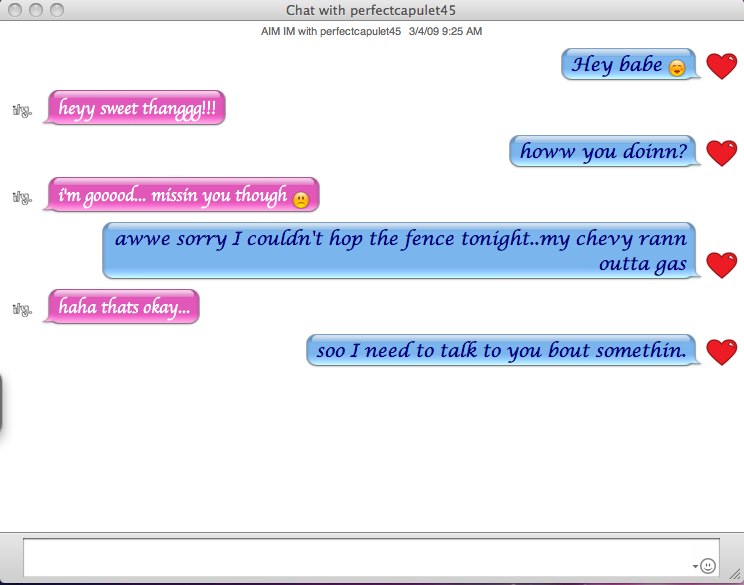
iChat to create a chat sequence. Screenshots are being taken to compile into Keynote. I have to let the students use my computers so they can get around the filter and blocking to make it happen. They also knew how to do the rest. I call this the learning back story or the learning that happens outside of the classroom. Most teachers are never aware of its existence although some are beginning to harness it into their Moodle courses.

Romeo 4

Scratch to create their Romeo and Juliet game
Comic Life to create comics to be used in Keynote or for print
Keynote for presentations which will become QuickTime Videos

So far students are using the following hardware tools
Flip Mino HD to shoot scenes
Logitech headsets

The reason this is so awesome for me is because of Daniel Pink’s book Whole New Mind as we are touching on the elements he discusses.

Last week I was having these same students take a Technology Assessment at Atomic Learning based on the NETS standards. Once they took it, they then started to work on creating their digital portfolio which will consist of a Word, Excel and PowerPoint document. Not my choices but are desired by the Upper School to show that students are capable of handling the curriculum from a technology point of view. If students complete all of the elements successfully, they will be exempt from taking any technology courses for the next four years. I only hope they get to work with a teacher like Mrs. Birgel who will employ creative projects that demonstrate all aspects of learning and the mind.

Technorati Tags: ,

iPod Touch + Kindle Software – Like Magic

WOW,
I read the posts and thought big deal. Over lunch (that is 10 minutes in teacher time), I downloaded, registered my iPod Touch and had the preview of Disrupting Class : How Disruptive Innovation Will Change the Way the World Learns (Kindle Edition) on my Touch. It was all down with Whispersync and is almost like magic.

Like Arthur C. Clarke formulated the following three “laws” of prediction:

1. When a distinguished but elderly scientist states that something is possible, he is almost certainly right. When he states that something is impossible, he is very probably wrong.
2. The only way of discovering the limits of the possible is to venture a little way past them into the impossible.
3. Any sufficiently advanced technology is indistinguishable from magic.

http://en.wikipedia.org/wiki/Clarke%27s_three_laws

The addition of the Kindle app and what else I have blogged about regarding these devices, leads me to be very excited about the near future of technology and our students.

During Mrs. Birgel’s class I found the link at Apple Learning Interchange on how the iPod Touch can touch a students world.
http://edcommunity.apple.com/ali/story.php?itemID=16472

We are at a great time for learning.

How should we equip our students? TI or iPod Touch – Snow Day Work

I think our school will need to suggest the best tools for our students. I had suggested in the past that all students would need an Apple Digital Learning device. Many in the audience looked confused. I meant an iPod Touch. I like the Touch more then the iPhone only because I am not prepared to suggest that students pay for a data plan ($), have a camera (quick shot of the exam), make a call/text during class when a Touch will what we need.
That said, I am very excited to see how far Lou can go with his search for the perfect tool for his students as I think our school will benefit.

I wrote earlier about a teacher who has a fire in his teaching about getting the tools into the hands of his Physics students.

His passion is evident as he is now looking for the best calculator. He did this on a Snow Day!

Here are his latest exchanges:
March 2, 2009 1:36 PM – Snow Day – no school

Hi Karl, Mike, Trevor and my Science and Math colleagues,

This e-mail was also posted in the all school site but thought this select group might miss it there.

With Karl Schaefer’s help, I am exploring the possible use of the iphone/touch as a classroom teaching tool. So far my exploration has been very interesting and I have found several apps that I can use right now in my physics classes.

The other day I was looking through the itunes store for graphing calculator apps. I have heard that some of the calculator apps are competitive with the TI’s the kids use. Some may be even better. Since these apps cost much less than an new TI calculator ($120.00 note by karl ) I thought it would be worth investigating-especially considering the much larger and vibrate display screen used by the iphone/touch compared to the TI calculators. As it turns out, I discovered several graphing calculator apps, all with some pluses and minuses. None got reviews that would encourage me to buy the app. in place of my TI…although my TI is quite old and in need of updating.

THEN I stumbled on a graphing calculator app that got incredible reviews. 2D graphing, 3D graphing, etc. Everything you’d want and more. Better than the TI’s. It was one of the most expensive apps I had ever seen (about $20 I think) but that is a LOT cheaper than a new TI calculator. And if it is better. Well, you do the math.

But, darn it… I can’t find the app again. I have tried every search tool in the itunes store I can think of. Unfortunately, I can’t remember the name of the app. This has happened to me before. One day an app is there, next day it is gone. Moved to some other location.

Has anyone ever heard of an app that fits this description? Has anyone bought it and used it?

I know this must be coming off as a pretty weird e-mail, but I would be embarrassed to even give you a hint as to how long I have spent trying to relocate this application again so I can buy it and test it out in “real time” in my teaching.

Lou

The first response was from a department chair: “Silly Lou I do not have a cell phone”

Monday March 2, 2009 8:30 PM – Still a Snow Day!

From Lou,

Danielle found the app I was looking for. It’s called SpaceTime. I have included an attachment that is a screen shot of its description. Math, science, etc. teachers might enjoy checking it out. It’s expensive and there are other graphing apps, but this one appears to be the most advanced. Thanks Danielle, Lou

Julie Williams sent the links to these other two graphing calculator apps. They are much cheaper, do a lot…although not as much as SpaceTime. They are also worth a look.

Picture 1-1

http://itunes.apple.com/WebObjects/MZStore.woa/wa/viewSoftware?id=289940142&mt=8

http://itunes.apple.com/WebObjects/MZStore.woa/wa/viewSoftware?id=293275263&mt=8

Technorati Tags: ,

Who is the Teacher Here?

A long weekend reveals these gems from my “students”.

Dear Mr. Schaefer,
Thank you so much for converting my MPEGs to DVs! I couldn’t have done my Independent Project without you! I really appreciate it! I hope you enjoy my picture of you working on my movie- I did it on Skitch!
Thank you,
Amanda

Amanda Jowell
Ryan created a tutorial of images on how to use the My Files.

Ryanexplainshomedirectory-2

Technorati Tags: ,

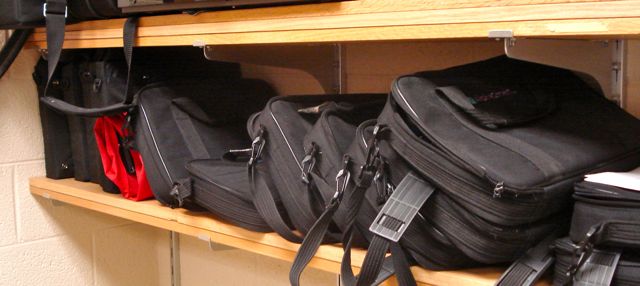
The Saga of Shelf Technology

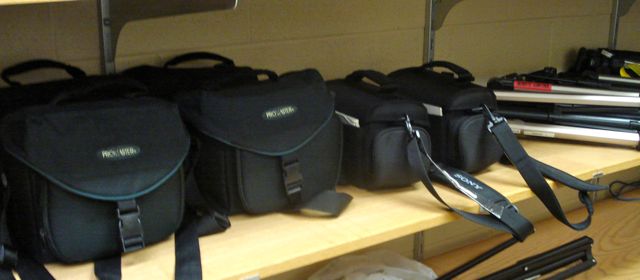
Dsc01661 AlphaSmarts waiting the call
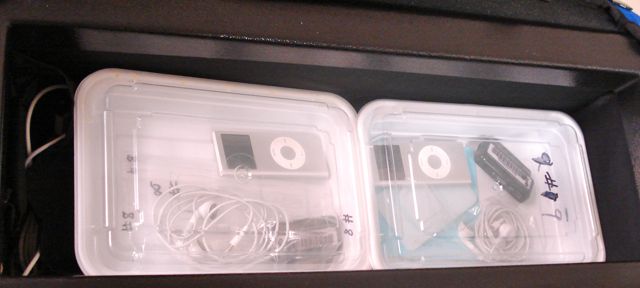
Dsc01664 iPods with Belkin Tune Talks ready for action
Dsc01663 Camcorders and Tripods rested and charged

I am guilty of stretching too far in what I want to do with our students as that is my nature. There is a fine balance between having the technology tools on hand for when I get to work with teachers and students, and having it on a shelf laying fallow. I suppose it has to do with the downturn in the economy and how I must approach my purchasing decisions that I am seeing things differently. Maybe it is the book I am reading by Thomas Friedman Hot, Flat and Crowded and how I think the culture of consumerism is unsustainable that has sparked these thoughts. I think the reflection and contemplation is a great turn of events as I am applying it in all areas of my life. I am by nature a gadget hound that often is the first person at my school to get a new device. I do this as part of my job so I know I must keep us at the forefront of learning devices and strategies. Those who know me know I am an Apple Fan Boy. I am also now known as “The Moodle Guy” so I go with the best tool for the task at hand.
What I am realizing is that there is far too much time that technology tools sit on a shelf waiting to be used for a class project. How do I combat this shelving of technology? Recruit and help teachers integrate more or is it a natural shift in what happens in education. Will I need more of fewer shelfs in the future?

Technorati Tags: , ,

Evidence of Digital Learning – Choice is Good

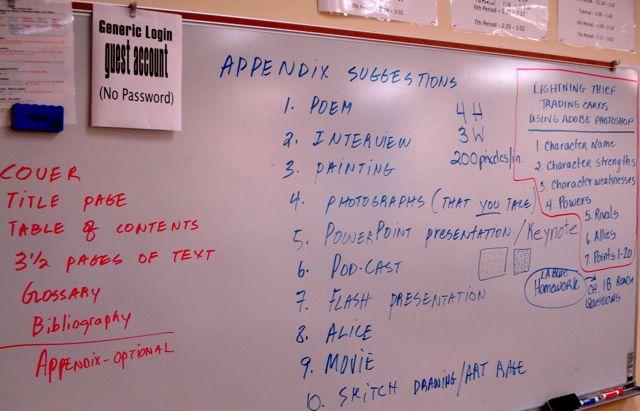
What happens in a class when some students finish the report on Vertebrate Animals? I was so excited to see this on the board when I walked through the lab that I took a picture to preserve it as well as document that I was not making it up.

Digitalskills
What you see in the picture is the basic requirements for the paper:
Cover (Hand-drawn image scanned in using the wonderful Snappy)
Title Page
Table of Contents
31/2 pages of text
Glossary
Bibliography
Appendix (Optional)

It is the list of Appendix ideas that impresses me the most. Mr. Bryson took suggestions and the students generated the list. It takes courage to do this on Mr. Bryson’s part as he does not know the applications listed. Of course, he tells his students this which allows for a flipping of roles in the class.

  1. Poem
  2. Interview
  3. Painting
  4. Photographs that you take
  5. Presentation with Keynote or PowerPoint
  6. Podcast
  7. Flash Presentation
  8. Alice World
  9. Movie
  10. Skitch Drawing
  11. Art Rage Drawing

Notice in the picture that another teacher has written directions on the Photoshop project for The Lightening Thief Book.

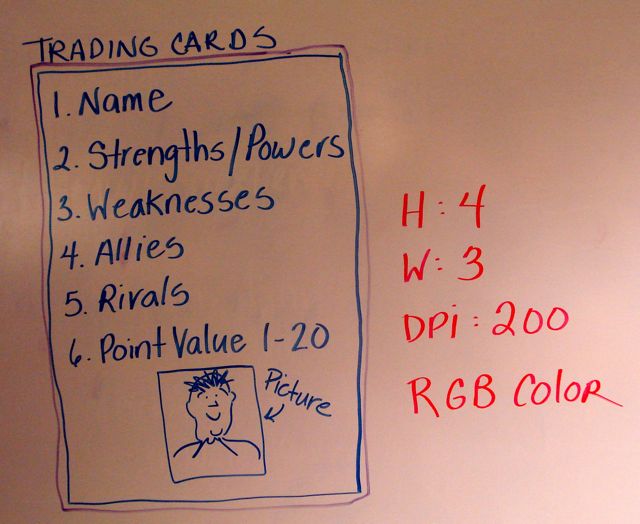
Update on 2/18/09: In the other lab, the trading card assignment now has a model for students to create. Notice the terms in red. How many students get exposed to this content enough to know and understand it. How about teachers?

Tradingcards
The environment of learning that is taking place with these students allows them to assemble a digital portfolio to be proud of and certainly meets the ISTE NETS.

Technorati Tags: ,

When you light a fire … learning grows

I have a colleague named Lou who has been corresponding to me about some work related technology questions. He happened to mention he had read a Wired article that mentioned some of the amazing iPhone/iPod Touch applications. Being a former teacher of Science and lover of Astronomy, I went directly to the iTunes App Store and found them and purchased them. I spent $21.99 to put them on an iPod Touch I could send to him to test last night.

Here is what I have heard back today in an email to me and his department marked Urgent, you must read:

Hi Trish and Barb,

I have been talking to Karl for a while now about the iphone and itouch. Do these devices have a place in our science curriculum and teaching? At first we chatted about simple tools like the iLevel. Handy in physics whenever you want to know if something is plum, level, or is a whole surface horizontal (i.e. a lab table). A digital, handy level is nice. We have one very expensive digital level in the lab, but the ilevel app is free! And it works!

Much more interesting, for physics at least, are the astronomy apps. Two itouch astronomy apps, for ex., are Starmap and GoSkyWatch Planetarium. Karl has been incredibly helpful and cooperative in working we me on this. Yesterday, he loaned me one of Computer Science’s itouches after having downloaded GoSkyWatch Planetarium and Starmap for me so I could take it home and experiment with it.

Even after one night of use, I am speechless. GoSkyWatch Planetarium, especially, is incredible. It not only is a portable planetarium, making it a huge resource for any astronomy activities a class or student may do, but it also is a celestial object identifier!!!!. Yes, that’s true. You point the back of the itouch toward the object of interest, the itouch screen changes as you move the itouch showing the section of the sky the back of the touch is facing. Wait until the object of interest is in the crosshairs and the program TELLS YOU WHAT THE OBJECT, CONSTELLATION, etc. you are looking at!!! I have not had enough time to experiment with the program totally, but this demands our attention as a science tool…at least for those of us who use astronomy in our curriculums.

Which brings me to my 2nd point. We should think about getting into the itouch, iphone apps development business. SERIOUSLY! We are teachers and scientists. There is nobody better positioned to think about educational applications for the iphone and itouch than us. This is a gold mine waiting to be harvested (mixed metaphore?). We would need to learn the language used by the iphone, and that is no small task for those who have not programed before, but…

For now, I would like to purchase an itouch for physics so I can continue investigating this tool and hopefully integrate it into all my physics classes. (Karl has offered to loan my his for a while, but I can already tell that this would be well worth the couple hundred dollar investment in our budget. I am taking a survey today just to see how many of my students have, or have easy access to, iphones or itouches. It’s looking right now like it’s about 50%, but it’s too early to know for sure. The younger kids seem to be more on to this than my seniors. Probably, b/c the older kids already had an ipod and are reluctant to get an itouch.

I am copying Karl on this, b/c I want him to know about my progress in such a short time and about my growing excitement about the use of this technology in teaching. As you know, I am a cautious adopter of technology in teaching. I like gadgets, but the iphone and itouch are NOT gadgets or play toys. These are serious computational devices and again, demand our attention.

My opinion of course.

I have attached the link to the site which describes GOSkyWatch Planetarium. The more you read, I think the more amazed you’ll be. GoSkyWatch cost $10. The other astro. app, I believe, is free [Karl’s note: $11.99]. iLevel, I believe, is also free. So the cost of these things is going to mainly be the cost of the itouch. I don’t know what is the cheapest way to buy these is, Karl would. GoSkyWatch is very memory intensive so if the itouch comes in different memory capacities the largest capacity would be warranted for that app. (This info. I gleened from reading some of the literature on line about the software.)

OK, that’s it for now. I have already typed for longer than permitted and you have had to read more than you probably wanted. Lou

I replied to him with the lyrics from Billy Joel’s We Didn’t Light the Fire

“We didn’t start the fire
It was always burning
Since the world’s been turning
We didn’t start the fire
No we didn’t light it
But we tried to fight it”

Technorati Tags: , ,

Students Connected Learning

As more and more students bring in digital learning devices, I should expect the types of exchange that I have had with a student to take place. In fact, on Monday I presented to the faculty about this very issue. Since students can bring in digital learning devices, are we helping, harnessing, or hindering the use by our students.

Here is an exchange by a 7th grade boy who asked great questions regarding his learning:

Hi Mr. Schaefer,
I was wondering if students are allowed to bring in a laptop of their own to work on during classes like taking notes and other stuff or does it depend on the teacher? Also, are students allowed to bring in a laptop for work use during study halls of educational purposes (of course).

This is my response:

Students are allowed to bring laptops or other digital Device to school and can connect them to the network so they have Internet and can even connect to the student servers if needed. I have directions and can assist. The Acceptable Use Policy states this.

Student Personal Laptops, iPods, Cell Phones, and other Digital Devices

Durham Academy believes the use of a digital device (laptop, iPod, etc.) can benefit the educational program if used appropriately. Students in the Middle and Upper School may bring a personal laptop to campus for their academic use. Prior to using it, they will need to set it up so it can connect to our network. Student’s wishing to do this should get the instructions from the divisional technology teacher. While on the Durham Academy network, all actions will be logged just like any other computer on campus using our installed network tools. Durham Academy is not liable for any loss or damage incurred, nor can it load any software onto a student computer. Students should secure their laptop in a locked locker or classroom. All students’ laptops and digital devices should be clearly labeled with the student’s name. Improper or non-educational use could result in loss of privileges for the on-campus use of such devices.

Depending on the teacher students should certainly be allowed to take notes or other class related work during class. Study hall should be a great place for you to use your laptop.

I have talked with the faculty about students bringing in their laptops and if we are helping them, harnessing the power or hindering the use by students. I think students should be able to use the laptop whenever it is appropriate for classwork and if you take notes, you should add them to a teachers Moodle course for other students.

My concerns are mostly related to securing the laptop when at school to prevent theft or damage.

What type of laptop do you have? Do you bring it to school? Have teachers told you that you can use it or that you can not use it?
Let me know if I can be of help.

His response to mine is also telling:

Thanks for your email. I have the regular white, 13 inch MacBook and its great! I have not brought my laptop in yet but now that I have your thoughts I will bring it in soon (and see you to hook it up) and talk to teachers about whether I am allowed to take notes in their class from now on using it. I have been interested in this because I do think (like you) that technology use from a laptop or iPod can be helpful to students and I think it would make daily school life easier.

So the question is when he brings the laptop to school we will help, harness or hinder? Do we build a community of learners who share content with each other in the open, or do we stick to the same way of learning?

As I was writing this post, a student came in and exclaimed he got a new iPod Touch for his birthday. And the beat goes on…..

Technorati Tags: ,