LotW for 4_22_10

Well, doing a weekly list of links is hard given the flood of activity going on in the labs. Maybe I should have called them LotWhen I Get Around to it?

Here are some good ones that came into this week.

2010 Horizon Report for K-12
This report lists trends and emerging technologies in K-12 education. A good read for where we are and where schools should be headed.

http://www.nmc.org/publications/2010-horizon-k12-report

From Virginia Hall
Does Font Choice Make a Difference in cost of printing? You bet it does! In fact, think before you print can also help save money.

http://blog.printer.com/2009/04/printing-costs-does-font-choice-make-a-difference/

Teaching About the Web includes Troublesome Parts
A great article about how we must use the very parts of the web that can cause some concern. I plan to use the CommonSenseMedia curriculum next year.

http://www.nytimes.com/2010/04/09/education/09cyberkids.html

The CRUDS
Never heard of them, well a picture is worth a thousand words. Look carefully.

http://www.golfdigest.com/golf-courses/golf-travel/buddies/2010-05/myrtle-beach-cruds

Individual Knowledge in the Internet Age by Larry Sanger – one of the founders of Wikipedia.
http://www.educause.edu/EDUCAUSE+Review/EDUCAUSEReviewMagazineVolume45/IndividualKnowledgeintheIntern/202336

From the article “analyze three common strands of current thought about education and the Internet. First is the idea that the instant availability of information online makes the memorization of facts unnecessary or less necessary. Second is the celebration of the virtues of collaborative learning as superior to outmoded individual learning. And third is the insistence that lengthy, complex books, which constitute a single, static, one-way conversation with an individual, are inferior to knowledge co-constructed by members of a group”.

From Loften D. – Never underestimate a sixth grader I say. He was showing me how he can now bring any of his or anyone’s Quizlets to his iPod Touch for offline review and studying. Very cool. This is a link to the Quizlet blog where they talk more about it.
http://quizlet.com/blog/archives/944

He likes the App Touchcards2 which is $1.99 in the App Store
http://slidetorock.com/apps/Touchcards-flashcard-learning-system.html
Technorati Tags: , ,

My Morning at Culbreth Middle School

Today I went back to where I began my teaching career to see how they have developed a strong technology program using iPod touches.

The notes below were typed using Evernote on my iPad. It worked beautifully and I even got to ask an Apple Engineer about how to get Google Docs to work. She assured me she would look into it and let me know. I told her that the lack of Google Docs is my only concern about suggesting this 1.5 pound device become standard for our students.I also met Tony Perez from Atlanta Girls’ School. They will become a 2 to 1 school next year as students will have a MacBook and an iPad.

My rough notes:

Teacher’s got them first – not too much planning or rules as that can stop innovation.
Chorus Class:

Musictheory.net was used to go over the notes study. Had booked marked. Used site as textbook for lesson.

Science class:
Headphones in baggies, 4 iMacs,1ipod cart, overhead, LCD projector with speakers, and 2 teacher MacBooks. One student did not have iPod so had to share headphones. iMacs looked like they were not running OS X but were being used for the Citrix setup. May have been same computers I helped set up. They still use FirstClass. iPods used video on race – gave out directions teachersdomain. Had teacher account.

History class:
mrstaberswiki.pbworks.com students watched video and took notes from teacher handout in notebook.

Math class:
Coin flip for probability app iHandy coin flip game. Chccs.k12.us/culbreth Robert bales

Science class:
Different teacher but used same lesson as other Science Teacher. Watched movie acceleration activities used same http://www.teachersdomain.org/asset/phy03_vid_velocity/

Each teacher had a small sheet of paper with questions and directions. At one point another student noticed a student using his iPod for something other then what he was supposed to be using and said “Vincent is using his iPod with unapproved app”. Public shaming is alive and well.

A Burmese student was using dictionary to translate notes.

Next steps:
Culbrethpodcasting.chccs.k12.us will be used for announcements and other information done by students on iPodsl .All will be done with podcast producer with wikis and blogs.
Classroom20.com is where you can find information on the program.

Other notes:
Started with a beta team and had them work with their students to learn how to use them the best. PD was how to use the device.Val now have 28 wifi stations. 16 carts with 622 iPods. ITunes account for each team. Val gets list of apps from teachers to get. They are added to laptop in the cart. Mobicip is the filter they use. http://www.mobicip.com/ they use premium account.

Conversations happen if issues come up with the report.al has a portable Bretford case for 20 iPods.iPads are coming for use in a sandbox lab. They will have students begin to write apps or other uses. Stuck in the shallow end ….. Book The hope is to get these into the homes of their students.

Technorati Tags: , ,

The iPads are close, very close

I have been busy reading up on the reviews of the iPad and listening to MacBreak Weekly episode. Here are some of the many roundups.

Articles
First Look at iWork for iPad
Developers seek to link iPad to Education
Andy Ihnatko’s Sun Times Articles
Learning Continuity – Google Spreadsheet of Educational iPad Apps
eLearning Blog – Is it any good for the classroom?
Walt Mossberg – Laptop Killer?

Podcast:
Andy Ihnatko said in MacBreak Weekly Epsiode 189 “This is the first new computer in 25 years”.

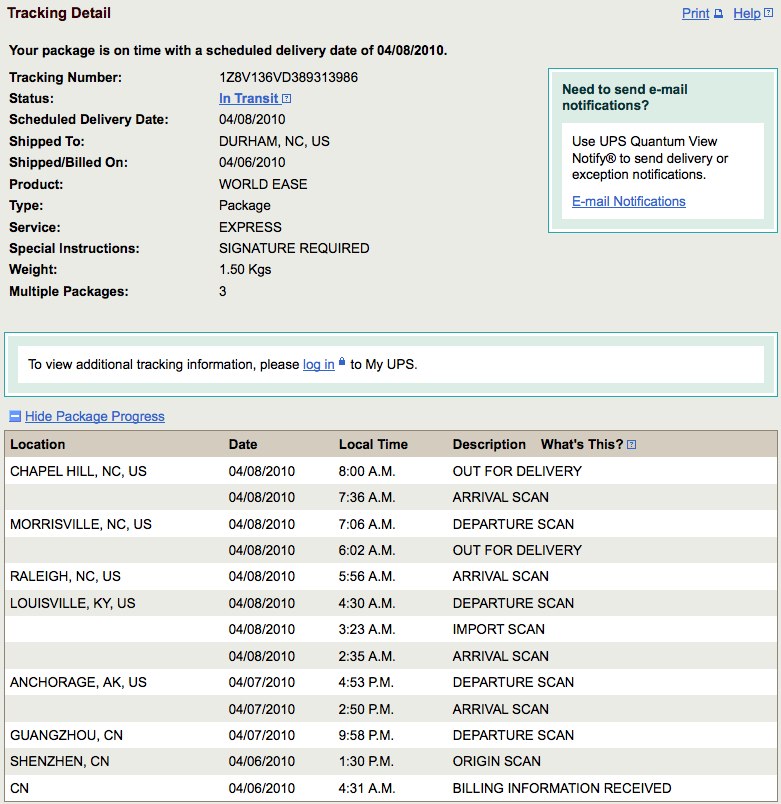
Shipping is today – come on UPS!
Ups  Tracking Information-1

Technorati Tags: , ,

Links for the week of April 6, 2010

Another week, another collection.

Apple iPad – The Guide Tours (Must include again in case you have not seen this new device)
http://www.apple.com/ipad/guided-tours/

Difference Between – Type in two terms and this site will give you, well the difference between the two terms
http://difference-between.com/

Learner.org is from the Annenberg Media. Some are paid but many are free
http://www.learner.org/index.html

Earth Day Network
http://www.earthday.org/

Teach Paperless – Earth Day Celebration – Signup and Pledge to go Paperless on April 22nd
http://teachpaperless.blogspot.com/

From Monday:
Gurian Institute http://www.gurianinstitute.com/

Quickdraw at LEARN NC
http://www.learnnc.org/lp/pages/787

Project Adventure
http://www.pa.org/

Technorati Tags: ,

Poetry in VoiceThread

Recently I had the opportunity to work with Sarah Parry and Claire Lescop to take poems written by students and create illustrated versions. The pictures were used to highlight the content of the poem in order to bring the poem alive via images. We used Keynote to assemble the poem, images, while also discussing copyright and creative commons. With this in mind, students used Creative Commons images which allow for use without attribution. Once the Keynote Slide was completed, they were exported as an image and upload via a Moodle Assignment. Teachers then added them to the VoiceThread while the students rehearsed their reading of the poem so they would be ready to record. Once the VoiceThread was ready, students donned the Logitech Headsets and recorded their poems. After recording their poem, the listened to others and added a comment.

After the process was complete, the VoiceThreads were shared on the main Browse page of VoiceThread for the world to appreciate. The project took 5 class periods not counting the writing of the poem.

This is a great example of an integrated unit that can extend what you already do in your classroom using digital tools.

Williams Carlos Williams inspired poems by Claire Lescop’s students
http://damiddle.ed.voicethread.com/share/722045/

Where I’m From poems by Sarah Parry’s students
http://damiddle.ed.voicethread.com/share/965530

I hope you enjoy them.

Technorati Tags: , , , ,

Lego Festival – Brick Magic

I got this the other day from the organizer:

The Lego magazine, Brick Journal, which is published in Raleigh. We are hosting a Lego festival, Brick Magic, on May 8-9, 2010, at the North Raleigh Hilton. This is the 1st annual event and we know that we will be at a larger venue next year! We expect @ 4000 visitors per day. Please see attachments to learn about Brick Magic.

There will also be a Lego film festival at the Carolina Theater in Durham on May 5th. We are having a Lego Car Contest on Friday, May 7th. Our guest of honor is Lego artist, Nathan Sawaya. As you can see…we have a lot going on!

I would like to invite you and your students/campers to attend. Schools in Wake County are participating in a fundraiser. The schools are sending a flyer (that we provide) home in the weekly folders. For every student ticket purchased, we will send $1 back to his/her school. This could benefit your camp. We would like to include Durham Academy. Please let me know if you are interested.

Please contact me with any questions. Thank you for your time!
Best,
Maria A.
Brick Journal
phone: 919-821-9643

It looks like a great opportunity for students and parents. I will not be attending as I will be involved with my daughters wedding.

Event: http://www.brickmagic.org/
Contest: http://midtownmag.com/showpage.asp?PageID=13
Brick Journal: http://www.brickjournal.com/
Nathan Sawaya Lego Artist: http://www.brickartist.com/

Technorati Tags:

Thought I would try Posterous after …

I listened to Ed Tech Talk Weekly http://edtechtalk.com/EdTechWeekly155 and heard them talk about how easy Posterous was. I had seen this used by many folks and thought today was the day I would try it. This is my first post using it.

Working on Today:
1. Getting Videos ready for Community Meeting.
2. Showing a teacher how to use the Assignment Module in Moodle to send response files back to his students. Seemed like magic to him almost as they could easily see them. It did take a minute or two for him to realize he needed to attach the file so the student could see his comments. Of course he was using Word which our students no longer have access to at school. It will open in Open Office even though the students first wrote it in Pages. I am sorry for the things we do to our students.
3. Working with a class that is beta testing Typing Aces http://www.typingace.com/ online typing as I want to see how well it works and what their feedback is. They use it and post their impressions into our Moodle forum.
4. Reading about the new Moodle iPhone app that is under development. More information at http://ignatiawebs.blogspot.com/2010/03/iphone-on-moodle-update-growing-team.html
5. Spoke with colleague about how I would like to see Durham Academy adopt Google Apps for Education so we can hook it in with Moodle for a true cloud computing solution.
6. Helped a parent and student who could not get access to a file started at school in Pages at home via email or the My Files Transfer. Would not have helped since they are using a Windows computer. That is why #5 is so important since #2 and #5 both dealt with file transfer issues.
7. Monitoring the NCTIES http://ncties.org/ conference via Twitter on the new Echofon http://echofon.com/ app. Big fan of it.
8. Having a conversation about my new class next year. Change is hard and it seems like sometimes folks would rather take the easy way to a solution instead of the best way.
9. Getting ready for Spring Break as I am ready ……

Posted via email from kschaefer’s posterous

LotW for 3_1_10

Thought this were work sharing.

PBS Digital Nation (a repeat but worthy for sure)
http://www.pbs.org/wgbh/pages/frontline/digitalnation/view/

Maps as History
http://www.the-map-as-history.com/index.php

iPod Response System – Imagine if every student could pull out their iPod Touch or iPad and respond to your question?
http://www.itate-solutions.com/edu-solutions/iresponse-classroom-responder-system/

Tech & Learning Digital Magazine – an example of how a paper magazine can be digitized. This and iPad Apps are in our future.
http://www.nxtbook.com/nxtbooks/newbay/tl_201003/#/1/OnePage

More on Digital Textbooks
http://bbridges51.edublogs.org/2010/02/22/dynamicbooks-the-next-step-in-the-digital-textbook-revolution/

The Committed Sardine by Ian Jukes – worth a look or subscription
http://www.committedsardine.com/index.cfm

Jenuine Tech – Creative Ideas for K-6
http://www.jenuinetech.com/index.htm

Wordle is off line and in copyright dispute with hopes for a positive ending.
http://blog.wordle.net/2010/03/what-happened.html

Technorati Tags: , ,

Help us win a Digital Music Lab

Dear Friends,
The 7th grade chorus has submitted a jingle and we need your votes to win. Please visit the link below to vote and leave us a comment. You can vote once each day!

We would appreciate you forwarding this to as many people as you can so we can collect votes. Grand prize is $10,000.00.

Please help us win so we can build a digital music lab at the Middle School.

Technorati Tags: ,

LotW for 2_22_10

Better late then never as the saying goes.

Wired Magazine shows how their magazine might look on the iPad
http://www.wired.com/epicenter/2010/02/the-wired-ipad-app-a-video-demonstration/


Xmarks allows you to have your bookmarks stored in the cloud/online. Works with Safari and Firefox. A great way to keep all of your bookmarks on more then one computer. There is also a new Search Tabs which will group your Google searches by topics related to your search terms.

http://www.xmarks.com/

November Learning Building Learning Communities Conference
Remember Brian Mull from last year’s Professional Day? He along with Alan November will be at the BLC in Boston.
http://novemberlearning.com/blc/

Apple Challenge Based Learning from
Example of how to add challenges into a class. Interesting ideas.
http://ali.apple.com/cbl/index.html

Brain Pop has loads of resources for almost any subject. Subscription required for total access although there are many free movies and lessons.
http://www.brainpop.com
Example of Digital Etiquette
http://www.brainpop.com/technology/computersandinternet/digitaletiquette/

Technorati Tags: , ,