New School Year – New Connection to Blog

I have been working to get back in the swing of the school year. I enjoyed my summer off and offline existence. Quite a change from my digital life at work. I could not connect to my blog for sometime using Ecto which is how I write my blog rather then online. Today, it worked so here I am. I even opened Twitter to discover old PLN friends tweeting away.

What has me excited for this year?

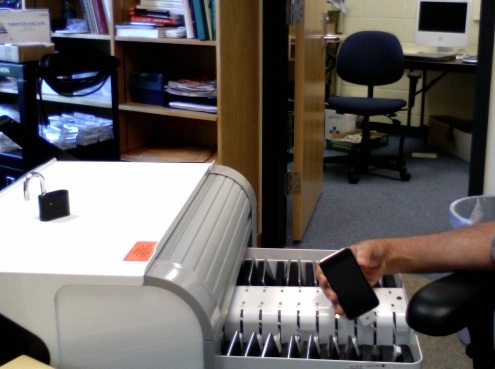
iPod Touch Cart
I am getting ready to deploy a cart of iPod Touches for use in classrooms. I have been working on setting them up so they connect to our wireless, have the apps on them I want our students to interact with and figuring out how to be legal with the purchasing of multiple copies of apps. Apple does not make it simple to do this purchasing.

Cart

Voicethread
Voicethread has gotten much of my time as we have it now for our students. I am getting ready to roll it out with students next week. I am very excited to deploy this learning tool as I see a lot of potential in all curriculum areas. The fact it can be embedded into our Moodle courses make it a natural extension.

Here is one done by students at 5th grade students at The Linsly School done with Melissa Tredenick who I know from our time together in North Carolina. Our students read the same book so I am hoping to share between our students.

Direct Link
http://voicethread.ning.com/video/5th-grade-summer-reading

Yabla
Working with a few Foreign Language teachers to integrate this resource into their Moodle courses.
http://www.yabla.com/
Moodle
The cart or container for all things we do here at school. WDIDBM (What did I do before Moodle?) – Less
I am happy to see this report on Blended Learning Environments
http://www.guide2digitallearning.com/professional_development/meta_research_k_12_online_learning_turns_little_research

Technorati Tags:

iTouch the Future of Learning – Says Who?

Last week I co-hosted an event at Durham Academy sponsored by the North Carolina Association of Independent Schools. The conference theme was on Blended Learning – When Brick and Mortar meets Virtual. We had a great crowd and I believe the day went well. There are many resources on the wiki so take a look.

We gave the participants an iPod Touch loaded with apps and no one asked how to use it? At least no one said, how am I supposed to start using this thing? What I saw was teachers, administrators, board members just sliding the unlock button and start using it. This is different from when we did a panel discussion and the first question was how to start using a blended learning environment. Just start is the best answer.

I sent the list of iTouch apps that Apple had installed to a teacher at the Upper School who has shown, shall I say, a strong desire to use this tool with his AP Physics students. I have written about him before but this is a classic. He took the list of apps and put them on his iTouch. He found many errors so he told the programmer. Here is a transcript of sorts as I have deleted out the name of the application to protect the person who is creating it and too keep my lawyers happy.

Dear Folks,  I just purchased ++++++++++ from the Apps Store.  I went to the physics section and was, simply put, disappointed and pretty shocked.  You have quite a number of errors or over simplifications of concepts that make the formulas simply wrong or misleading.

1. Your formula for force is stated as F=ma.  Actually, the formula is Fnet=ma.  This is not a trivial point since in any situation where more than one force acts on an object (many, MOST, situations) ma equals the vector sum of all the forces, i.e. Fnet.

2. Your formula for weight states that “g” is “gravity.”  This may sound picky, but “g” does NOT stand for gravity (which is a force) but rather the ACCELERATION DUE TO GRAVITY.  I believe your statement would be much better if you said “g is the acceleration due to gravity.”

3. Your “formula” for Gravity is stated as g=9.8 m/s.  This is incorrect on two fronts.  If you want to give the simple formula for the force of gravity it would be Fgravity = mg…not g=9.8 m/s!  Also, g (as I stated in #2) stands for the ACCELERATION DUE TO GRAVITY.  The acceleration due to gravity at the surface of the earth is 9.8 m/s/s or 9.8 m/s^2.  You have the wrong units for g, the acceleration due to gravity!  m/s is speed.  m/s/s is acceleration.  By the way, you will notice that the formula for Weight and the formula for the Force of gravity are the same…mg.  This is because, as long as you are not accelerating, such as in an elevator or a roller coaster, the force of gravity down on you will equal the force of a scale up on you so that you do not move. Scales read your weight.

4. Your formula for “Gravitation,” which is Newton’s more complex and general formula for Gravity, is TOTALLY wrong and confusing to boot.  You have written it as…”6.67 x 10^-11 Nm^2/kg^2.  Newton’s General Formula for the force of Gravitation is: Fgravitation = Gm1m2/r^2  where G is the Universal Gravitational Constant and is equal to 6.67 x 10^-11 Nm^2/kg^2.

So, your formula for Gravitation is actually just the value for G (number and units)!  G is just one part of the whole formula used to calculate the force of gravity between two objects, m1 and m2   a distance, r, apart. For example, this formula could be used to find the force of gravity by the sun on the earth.

5. Your “Basic eq’s of Motion” lists 4 formulas on one screen with a very rudimentary explaination-to the point of almost being useless.

I am a physics teacher.  (Maybe you guessed that by my comments!) I have encouraged my students to download your app as I thought it would be a nice resource for all the relationships we use in the study of nature through the “prince of sciences”.  Your app is significantly deficient in the number of physics formulas it covers and it is very disappointing to see the very poor proof reading that went into those formulas.  Just for fun, I have attached a formula sheet I use in my classes for Mechanics.  I hope they offer you a glimpse of what your app could do if more time were spent refining it-at least in the physics section.

I’m really not trying to be obnoxious here and I certainly don’t take any delight in telling you about all your mistakes.  But, I am now in a situation where my students have a ticking time bomb app on their iphones and itouches.  I will correct what you have written for them, but it would be very nice if you repaired these formulas.  It would, as a minimum, save you from having to receive harangues from physics “know it alls” like me. 🙂

Sincerely, Louis Parry

This of course leads to a major concern as to whether the applications being written are akin to what wikipedia once was for some folks. Who are the folks writing these applications?

What follows is the response from the creator of the application:

Mr. Parry:

Thank you for sending me these vital corrections. 

To begin, I completely understand your frustration and anger – you and your students have paid for an app, and with it should come the most correct information. I apologize for failing to do so. I am, myself, a high school student, and I am constantly refining ++++++++++ for maximum accuracy. Having physics next semester, using any of these “formulas” would land me a lost credit.

All of these inaccuracies will be changed immediately, and will add/remove/correct/change as per your attached PDF. Expect an update within the week (Apple takes around that long to approve app updates.) 

Thank you very much for the heads-up: you have gone a long way to improve the app for everyone. Please keep in touch if you would like any additional formulas added or have more comments. I would be delighted to send you some promo codes so more of your students could download +++++++++ free of charge. Just shoot me an email.

B.

Lou just shared with me that he is helping him to understand the formulas. That is how we will teach in the future, no one will know who is the expert but we will all be responsible for fact checking and helping to improve each others work.

Technorati Tags: , ,

iPod Touch + Kindle Software – Like Magic

WOW,
I read the posts and thought big deal. Over lunch (that is 10 minutes in teacher time), I downloaded, registered my iPod Touch and had the preview of Disrupting Class : How Disruptive Innovation Will Change the Way the World Learns (Kindle Edition) on my Touch. It was all down with Whispersync and is almost like magic.

Like Arthur C. Clarke formulated the following three “laws” of prediction:

1. When a distinguished but elderly scientist states that something is possible, he is almost certainly right. When he states that something is impossible, he is very probably wrong.
2. The only way of discovering the limits of the possible is to venture a little way past them into the impossible.
3. Any sufficiently advanced technology is indistinguishable from magic.

http://en.wikipedia.org/wiki/Clarke%27s_three_laws

The addition of the Kindle app and what else I have blogged about regarding these devices, leads me to be very excited about the near future of technology and our students.

During Mrs. Birgel’s class I found the link at Apple Learning Interchange on how the iPod Touch can touch a students world.
http://edcommunity.apple.com/ali/story.php?itemID=16472

We are at a great time for learning.

How should we equip our students? TI or iPod Touch – Snow Day Work

I think our school will need to suggest the best tools for our students. I had suggested in the past that all students would need an Apple Digital Learning device. Many in the audience looked confused. I meant an iPod Touch. I like the Touch more then the iPhone only because I am not prepared to suggest that students pay for a data plan ($), have a camera (quick shot of the exam), make a call/text during class when a Touch will what we need.
That said, I am very excited to see how far Lou can go with his search for the perfect tool for his students as I think our school will benefit.

I wrote earlier about a teacher who has a fire in his teaching about getting the tools into the hands of his Physics students.

His passion is evident as he is now looking for the best calculator. He did this on a Snow Day!

Here are his latest exchanges:
March 2, 2009 1:36 PM – Snow Day – no school

Hi Karl, Mike, Trevor and my Science and Math colleagues,

This e-mail was also posted in the all school site but thought this select group might miss it there.

With Karl Schaefer’s help, I am exploring the possible use of the iphone/touch as a classroom teaching tool. So far my exploration has been very interesting and I have found several apps that I can use right now in my physics classes.

The other day I was looking through the itunes store for graphing calculator apps. I have heard that some of the calculator apps are competitive with the TI’s the kids use. Some may be even better. Since these apps cost much less than an new TI calculator ($120.00 note by karl ) I thought it would be worth investigating-especially considering the much larger and vibrate display screen used by the iphone/touch compared to the TI calculators. As it turns out, I discovered several graphing calculator apps, all with some pluses and minuses. None got reviews that would encourage me to buy the app. in place of my TI…although my TI is quite old and in need of updating.

THEN I stumbled on a graphing calculator app that got incredible reviews. 2D graphing, 3D graphing, etc. Everything you’d want and more. Better than the TI’s. It was one of the most expensive apps I had ever seen (about $20 I think) but that is a LOT cheaper than a new TI calculator. And if it is better. Well, you do the math.

But, darn it… I can’t find the app again. I have tried every search tool in the itunes store I can think of. Unfortunately, I can’t remember the name of the app. This has happened to me before. One day an app is there, next day it is gone. Moved to some other location.

Has anyone ever heard of an app that fits this description? Has anyone bought it and used it?

I know this must be coming off as a pretty weird e-mail, but I would be embarrassed to even give you a hint as to how long I have spent trying to relocate this application again so I can buy it and test it out in “real time” in my teaching.

Lou

The first response was from a department chair: “Silly Lou I do not have a cell phone”

Monday March 2, 2009 8:30 PM – Still a Snow Day!

From Lou,

Danielle found the app I was looking for. It’s called SpaceTime. I have included an attachment that is a screen shot of its description. Math, science, etc. teachers might enjoy checking it out. It’s expensive and there are other graphing apps, but this one appears to be the most advanced. Thanks Danielle, Lou

Julie Williams sent the links to these other two graphing calculator apps. They are much cheaper, do a lot…although not as much as SpaceTime. They are also worth a look.

Picture 1-1

http://itunes.apple.com/WebObjects/MZStore.woa/wa/viewSoftware?id=289940142&mt=8

http://itunes.apple.com/WebObjects/MZStore.woa/wa/viewSoftware?id=293275263&mt=8

Technorati Tags: ,